
ScrollView
import { ScrollView } from "std-widgets.slint";export component Example inherits Window { width: 200px; height: 200px; ScrollView { width: 200px; height: 200px; viewport-width: 300px; viewport-height: 300px; Rectangle { width: 30px; height: 30px; x: 275px; y: 50px; background: blue; } Rectangle { width: 30px; height: 30px; x: 175px; y: 130px; background: red; } Rectangle { width: 30px; height: 30px; x: 25px; y: 210px; background: yellow; } Rectangle { width: 30px; height: 30px; x: 98px; y: 55px; background: orange; } }}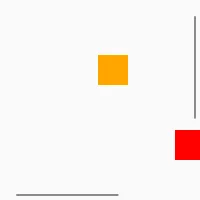
A Scrollview contains a viewport that is bigger than the view and can be scrolled. Compared to a plain Flickable it has scrollbar to interact with.
The ScrollView is scrollable if the viewport-width and viewport-height properties
are bigger than the size of the visible area.
If the ScrollView contains a layout, the default value for the viewport-width and
viewport-height is the minimum size of that layout.
Properties
Section titled “Properties”enabled
Section titled “enabled” bool default: true
Used to render the frame as disabled or enabled, but doesn’t change behavior of the widget.
mouse-drag-pan-enabled
Section titled “mouse-drag-pan-enabled” bool (in) default: true for Material style, false for all others
When true, the view can be scrolled by dragging with the mouse.
has-focus
Section titled “has-focus” bool (in-out) default: false
Used to render the frame as focused or unfocused, but doesn’t change the behavior of the widget.
viewport-width
Section titled “viewport-width” length (in-out) default: 0px
The width of the viewport of the scrollview.
viewport-height
Section titled “viewport-height” length (in-out) default: 0px
The height of the viewport of the scrollview.
viewport-x
Section titled “viewport-x” length (in-out) default: 0px
The x position of the scrollview relative to the viewport. This is usually a negative value.
viewport-y
Section titled “viewport-y” length (in-out) default: 0px
The y position of the scrollview relative to the viewport. This is usually a negative value.
visible-width
Section titled “visible-width” length (out)
The width of the visible area of the ScrollView (not including the scrollbar)
visible-height
Section titled “visible-height” length (out)
The height of the visible area of the ScrollView (not including the scrollbar)
vertical-scrollbar-policy
Section titled “vertical-scrollbar-policy” enum ScrollBarPolicy default: as-needed
The vertical scroll bar visibility policy.
ScrollBarPolicy
This enum describes the scrollbar visibility
as-needed: Scrollbar will be visible only when neededalways-off: Scrollbar never shownalways-on: Scrollbar always visible
horizontal-scrollbar-policy
Section titled “horizontal-scrollbar-policy” enum ScrollBarPolicy default: as-needed
The horizontal scroll bar visibility policy.
ScrollBarPolicy
This enum describes the scrollbar visibility
as-needed: Scrollbar will be visible only when neededalways-off: Scrollbar never shownalways-on: Scrollbar always visible
Callbacks
Section titled “Callbacks”scrolled()
Section titled “scrolled()”Invoked when viewport-x or viewport-y is changed by a user action (dragging, scrolling).
ScrollView {    width: 200px;    height: 200px;    viewport-width: 300px;    viewport-height: 300px;    Rectangle { width: 30px; height: 30px; x: 275px; y: 50px; background: blue; }    Rectangle { width: 30px; height: 30px; x: 175px; y: 130px; background: red; }    Rectangle { width: 30px; height: 30px; x: 25px; y: 210px; background: yellow; }    Rectangle { width: 30px; height: 30px; x: 98px; y: 55px; background: orange; }
scrolled() => { debug("viewport-x: ", self.viewport-x); debug("viewport-y: ", self.viewport-y); }}© 2026 SixtyFPS GmbH